Calculator Fun setup and features
Download Calculator Fun, a free offline Windows calculator with scientific math, a unit converter, history, and mini-games.
- windows app
- calculator
- student tools
- product update
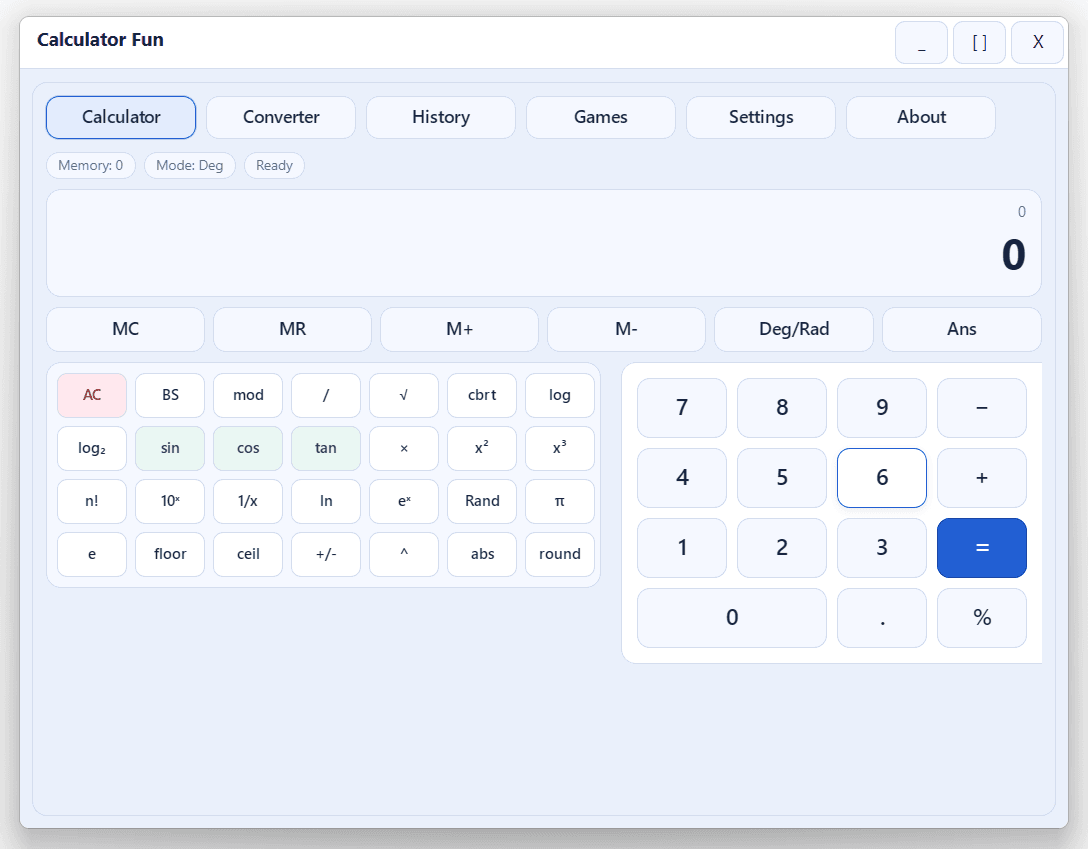
Calculator Fun is a full-featured Windows desktop app built with a Sciter-based UI and a native C++ host. It is meant for anyone who wants more than a basic calculator without installing a heavy suite.
What you get in one window
- Scientific calculator with memory, roots, powers, logs, trig, and keyboard-friendly input
- Unit converter across practical categories (length, mass, temperature, speed, time, and more)
- Calculation history so you can review recent work without losing context
- Mini-games (guess number, quick math, tic-tac-toe, and others) for practice and breaks
- Settings for theme, angle mode, decimal places, and hints — all saved automatically
Who it is for
Students, homework sessions, and everyday number work benefit from having math, conversion, and light practice in a single offline-friendly app. If you only need a tiny four-function tool, this might be more than you need—but if you like one place for serious math and quick learning games, it is a strong fit.
Download or build from source
- Installer: download Calculator_Fun_Setup.exe from the product page (standard Inno Setup flow with shortcuts and uninstall)
- Source code: full project on GitHub — moeezshakir/Calculator_fun_Sciter_js
For developers
The repo is a Visual Studio solution (Calculator_fun.sln) targeting Sciter 6.0.3.10 with a C++ host and HTML/CSS/JS UI (Calculator_fun/res/).
| Step | What to do |
|---|---|
| Open | Calculator_fun.sln in VS 2026 Insider (toolset v145); retarget to v143 on older VS if needed |
| Build | Debug or Release, x64 or Win32 — output in Bin\<Platform>\<Configuration>\ |
| Runtime | Copy sciter.dll from Sciter_SDK next to Calculator_fun.exe — required to run |
| Setup | After a successful x64 Release build, compile Calculator_Fun_Setup.iss in Inno Setup |
Settings persist to %AppData%\Calculator_fun\. If you change Sciter versions, replace the DLL and headers, then Clean and Rebuild. See the README in the repo and the Sciter site for more.
References
Links and resources
Related
